Sunday, 25 August 2013

Build Review - Eduard 1/48 Messerschmitt Bf109E-7 Tropical

There is not exactly a shortage of Bf109 kits out there in the wild. With the possible exception of the Spitfire it is probably the most kitted aircraft there is. And most of them are actually pretty good, even the ancient Airfix moulds. So when Eduard decided a couple of years back to throw their 21st century technology into the Bf109 ring, many asked "Do we need more?". Well if you are not providing a new modelling subject, your only chance of success is to be better than the rest, and Eduard have a happy history of doing just that very thing. Not only are their modern kits of exceptional moulded quality and accuracy, they have also taken advantage of their long history of being the industry standard for photo etched detailing sets and canopy masks, and thrown these into the ProfiPack series as well. Combined with consistently excellent decals, the end result is arguably the best value for money on the market today.

I was looking to build a tropical Bf109 for a diorama idea I had been mulling on for a while, and I wanted it to be "engine exposed". I knew from experience that the Eduard 109E has a beautiful engine option that is a work of art in its own right, and so when they produced this tropical E-7 it was a complete no-brainer for me.

The box contains four dark grey sprues and one clear, along with two etched metal frets, canopy masks and two decals sheets, a very detailed set of stencils and another containing markings for five different aircraft. Two of those aircraft (interestingly) do not have specifically tropical colours, one of the others I had built previously and one I felt looked rather boring, so it came down to the box top version for me.

The cockpit interior is very nicely moulded indeed, and is enhanced with a few pieces of etch (as well as the seat belts). I sprayed it RLM02 and after a light dry brushing with Revell "Steel" (best for this purpose I find) I picked out the details with a fine brush. I opted to use the etched instrument panel which comes in a separate dial and fascia layer (as is often the case). You can also use a decal (oh no, not me) or paint it up yourself from the nicely moulded version which I would normally do, but if there is etch provided, that's what I will use. Finally, I gave the whole interior a wash of thinned black oil paint.


Next on the agenda is the engine and firewall elements which have to be done before the fuselage is closed up. Note that if you don't want to expose the engine and have a closed cowling, you need to omit a number of parts, including the guns, and also trim a substantial amount off the front end of the engine block. So you cannot have both worlds here, the kit engineering (in particular the thickness of the cowling pieces) simply do not allow it so you have to make your choice early. The engine is exquisitely moulded and builds up from a number of parts really well. The Eduard colour call outs are suspect in places, however, so check your references. I sprayed the whole engine block with "Dark Iron", followed by a satin varnish and some light dry brushing to get the right effect, then picked out the HT leads and plugs with a fine brush. I also added a little extra wiring of my own from fine styrene rods as there is no representation of the control wiring harnesses.

The engine is then attached to the firewall with nicely moulded mounting arms and rather surprisingly, this all went together with no fuss at all. I left off the top mounted guns for now as these would make masking off the engine area  for painting more difficult. The fuselage is now brought together around the engine/firewall structure and the cockpit tub, and this all clicked into place with no argument.

The wings go together next, and these fitted perfectly. However note that, as it comes, the kit forces you to deploy the flaps and slats. If you wanted a clean configuration then a small amount of kit surgery will be required, although it is very straightforward. The wing section then fits neatly to the fuselage, although I threw in some filler for good measure at this stage. Likewise the tail section presents few problems, but I did find that by default it was a little skewed and needed some gentle bending to get straight. I left off the rudder for now as my chosen colour scheme required it yellow and painting it separately made most sense. Similarly, the undercarriage was not attached at this stage.

The canopy is in three sections. I masked and glued in place the front and rear (permanent) sections. The centre section I glued in using a tiny blob of cyanacrolyte since I would need to remove it cleanly later to pose it open after painting. This saved having to mask out the cockpit and also gets the centre canopy painted as part of the whole.


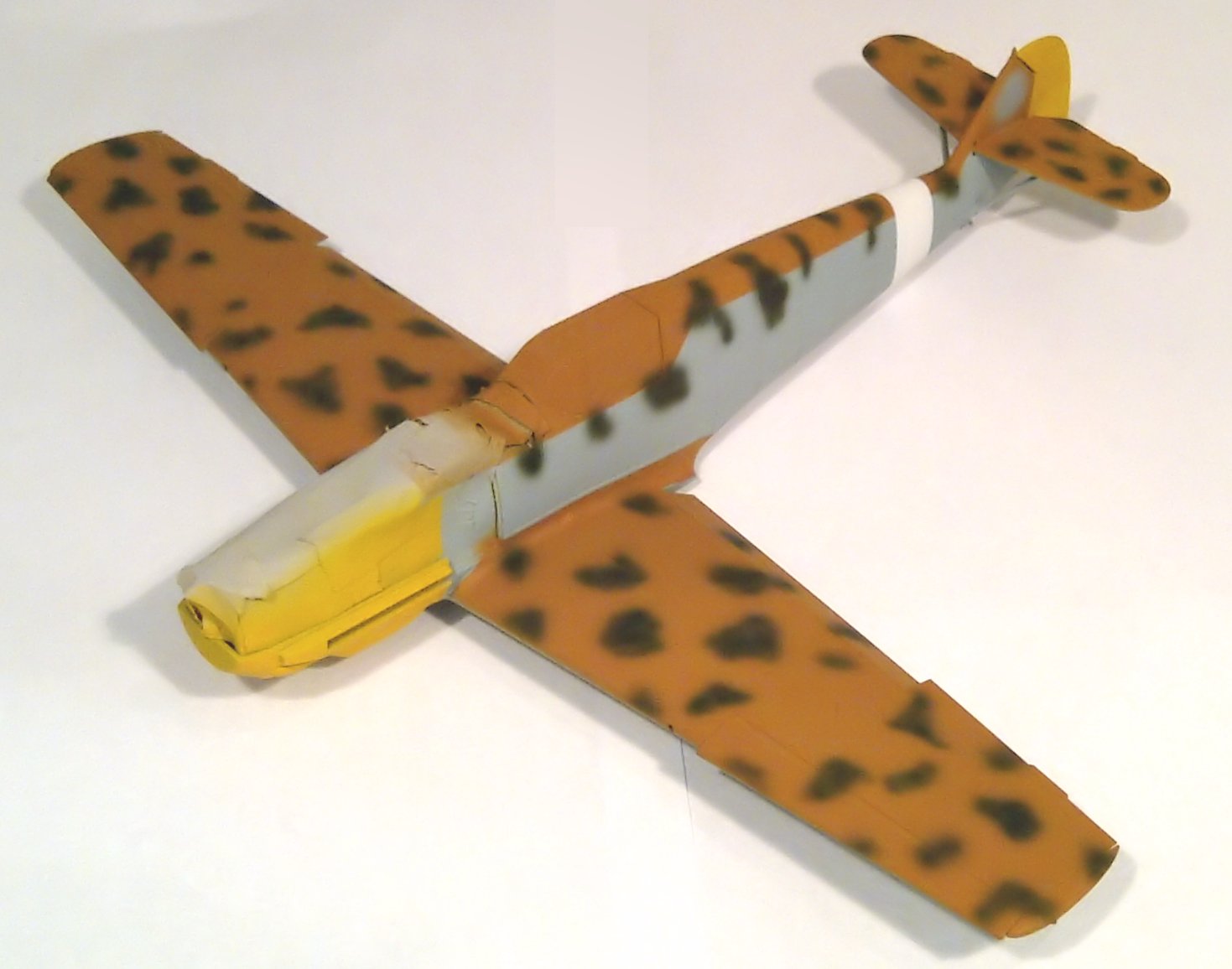
In preparation for painting, I also masked off the various air intakes and, of course, the engine assembly very carefully, the cowling parts would be painted alongside the main airframe. I started with a thin layer of Tamiya primer, I did not want to destroy the delicate surface detail. The yellow nose and rudder were sprayed first, and then the lower nose section masked off as this is much easier to do than mask of the rest of the airframe later. Next the entire plane was sprayed with RLM78. I use my own mix of equal parts Tamiya XF-23, XF-19 and XF-2 for this, which I find works well. The upper wings and top of the fuselage need a solid coat of RLM79 and this was simulated with a mix of XF-59 and XF-64, applied after masking the entire underside and sides accordingly. I then applied the "blotches" using XF-27. The paint call out calls for RLM80 (Olive green) but this looks far to pale for my liking. Contrary to perceived wisdom, I find it easier to apply this kind of mottling with a very high airbrush pressure and very restrained pulling back on the trigger. Many people go for low pressure and thin paint but I find this can "spatter" too easily.

The final painting job was to mask off and apply the white fuselage band. I probably should have done this in advance and masked over the band, but to be honest, I forgot. Anyhow, when all was done the whole plane and cowling parts all got a good coat of Klear and they were set aside to cure. Whilst that was happening, I took the opportunity to paint and assemble the undercarriage and propeller parts. Eduard have got the wheels just right. They provide the tyres and wheel centres as separate parts, which is a real godsend to us modellers as to be honest, there is no bomb-proof way of getting a good wheel/tyre paint separation whether using masks or very careful brushwork. Personally I generally use the latter but where the parts are separate you know you are going to get a perfect result.

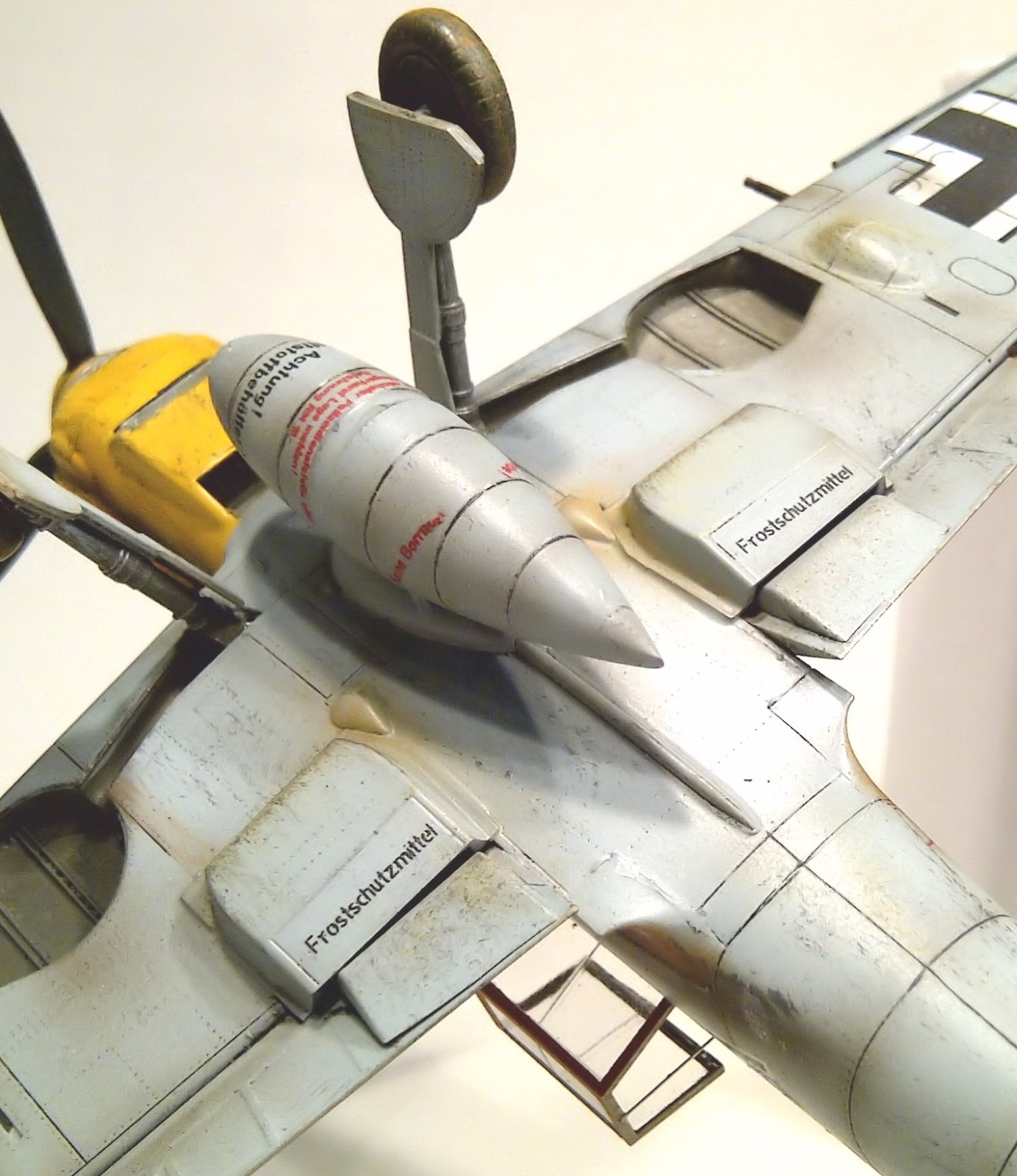
When the varnish was dry, I set to applying the decals. As with all Eduard decals I have used, these performed pretty much flawlessly, especially in combination with a little Micro Sol to bed them down. I only have one complaint, the stencils are on extremely thin backing film. This is normally a good thing for the end result, minimising any trace of it. However for some of the larger stencils, particularly those on the under belly fuel tank, I had real trouble with them creasing up and having to untangle a tiny folded decal is a near impossible task. Fortunately I had some spares left over from a previous Eduard 109 build which saved the day when I had to abandon a couple of them in despair. Anyhow, once all was done, another coat of Klear sealed everything in.

Once dry, I applied a black oil paint wash to the panel lines and this brought out the details superbly.This was followed by a couple of coats of matt. I then randomly sprayed a fine filter of very thin white over the whole model to give some random shading and also to simulate sun bleaching. This was followed by a fine post shade of black/brown mix to pick out the major panel lines.

Attaching the final parts was mainly straightforward, the undercarriage, rudder and spinner. However Eduard have still not learnt from an internet full of complaints about the exhaust stacks. Why oh why do they insist on providing each exhaust stub as a separate piece? There is really no need for it. It just makes their installation a bit of a nightmare in terms of fitting them and lining them up. It is also a big problem on their Bf110 kits as well, where there are twice as many to deal with.

I then applied some final weathering. Exhaust staining was done with brown pastels and enhanced with a fine black/brown spray. A few oil streaks were applied with burnt umber oil paint and some dark grey dry brushing to dirty up the cowling and underbelly areas. Finally, a little red/brown pastel was rubbed into the wheels and lower extremities to simulate a bit of desert sand and grit.

Despite the couple of gripes, I really cannot complain too much about this kit. It is simply superb in all other respects. Crisp, finely detailed, accurate and fitting together like a dream. Everything a kit should be. I hope Eduard continue to invest in new moulds as this truly is state of the art modelling. Their new Spitfire IXc has already set the industry ablaze and I am looking forward to getting my hands on one.

www.bowemodels.com


Tuesday, 13 August 2013

Comment - A Fear of Flying

I've just arrived home from a couple of weeks in California, driving with my family up the coast from Los Angeles to San Francisco doing the tourist thing, taking in a the sights on the way. And a very nice time we had too - I can highly recommend it. But you did not come to this page to read about my holidays. What this post is about is the 10 hours I had to spend each end of my holiday on an aircraft.

Spending this sort of time cramped up in the belly of a metal cylinder is not most people's idea of fun, and at best is viewed as a necessary evil in order to experience at first hand the wonders that this planet has to offer us mere mortals. The airlines do a creditable and well meaning job of trying to persuade us that "your holiday begins when you step on board" and all that, with their hot towels and, if you are lucky, personal video screens complete with selection of the latest movies, but who are they kidding? At the end of the day it is a pretty miserable experience. And for a fair few of us, it is worse than that.

This may be a surprise to you, coming from someone who's waking hours are generally spend mired in the world of all things aviation, but I confess to the world that I'm actually terrified of flying. For me, aircraft are best admired from the outside. From the ground. You may laugh and think I'm being ridiculous, or you may even sympathise, but that is the way I am, and despite having flown for business and pleasure my entire adult life (often several times a week in my previous incarnation as an I.T. consultant) this fear has never receded. It does not physically stop me, I do generally manage to control it (usually with the help of extreme stoicism and a certain amount of alcohol), but it is the fly in the ointment of every travel experience for me. If you were to offer me a flight in a Spitfire over the English Channel, my excitement and sense of occasion would far outweigh any trepidation, but a 747 over the Atlantic? No thanks.

The sensible part of me knows that this fear is irrational, and deep down I know that I am far safer on an aircraft than on any other mode of transport, but any of you who share my phobia will know that this does not really help at the time. Flying on an aircraft is such a different and mind bending experience compared to all other surface based methods that is it hard to make any comparison. I understand the science and physics as well as, indeed maybe better, than most. But hurtling through the air, several miles above the ground, in a metal container weighing hundreds of tons, at speeds ten times those experienced in most everyday situations, and then expecting it to all end happily, just seems plain wrong on a primeval level. Airport and tourism staff don't help either. Why do they insist on wishing you a "safe flight"? Don't they realise that, for us phobics, they are therefore implying that there is a chance that it won't be? And "did you have a good flight?". Please. I'm here, alive and uninjured, aren't I? Therefore it was, by my definition, good.

But before I am accused of creating new phobics, we must not forget that it is a remarkable thing that mankind has achieved here. Not only are the speeds, technical accomplishment and efficiencies so far beyond anything else we would ever experience outside of a space program, but we have managed to make it unbelievably, nay incomprehensibly, safe. The fact that on the extremely rare occasion something does go tragically wrong it is global news, proves this point. And what is more, the "magic" of flight is undoubtedly what has always drawn me to the world of aviation and given me such respect for the pioneers and history of it. As you know, military subjects are closest to my heart, the most respect goes to those pilots. At least when I get on a plane to go on holiday I am not pursued by a squadron of fighters with big cannons all hell bent on making sure I don't arrive at all.

But if, like me, you are a worrier, nothing really helps, I know. Most people on the plane around me are probably thinking about what they were going to do when they get to their destination, or some other mundane future activity. Me, I'm just sitting there waiting for a messy end being torn to bits in the massive fireball that a part of me is sure will happen any second.

At least I'm not bored.


Tuesday, 2 July 2013

Build Review - Italeri 1/48 Bell UH-1N

It's not uncommon for me to be presented with a photo from a customer accompanied by a request to "build one of those". There then follows some serious research to see what is available in terms of kit, decals, conversions etc. This happened recently when I was presented with a photo of the Bell 412 EPI demonstrator helicopter. The customer wanted a 1/48 model of this very beast. Now there is no 1/48 kit out there of the Bell 412, let alone the EPI version. But Italeri do a decent kit of it's little sister, the Bell 212 (albeit in the guise of the military UH-1N). There is also a conversion set by Belcher Bits (available via Ultracast) to turn this kit into a CH-146 Griffon. This is the Canadian military version of the 412 EP, and is close enough, with a little scratch work to boot. So kit and conversion set in hand, and a large photo of the 412EPI on my computer monitor, I set about this project with not a little trepidation.

The Belcher Bits conversion set contains rather more parts than I needed since the CH-146 is adorned with various military paraphernalia. However the important parts for me were the enclosed transmission fairing, and of course the four bladed rotor.

The build starts with the interior and I built the basics up using the kit parts but used the two pilot seats provided by the conversion set, which are a little more true to the 412 than the kit parts. The first challenge arose with the instrument panel. The kit part represents the "old fashioned" Twin Huey layout full of dials, however the "I" in EPI, as well as uprated avionics, also signifies a glass cockpit. So using some etch parts from the spares draw I attempted to reproduce this over the top of the kit part. It's not perfect, but I assumed (correctly) that little will be visible when the model is completed. The centre console was picked out carefully with a fine brush and the passenger seats around the engine walls were fixed in place.

The fuselage closed up without protest, although there is a lot of glazing to install and mask which took some time. That said, the fit of the glazing (and the kit in general) is excellent and very little filling and clean up was required.


At this stage a couple of other significant scratch modifications were required. Firstly, the tail fin had to be re-shaped to represent the "fast fin" on the 412 UPI demonstrator. This is an option on the 412 but I wanted to replicate the photo I was working to as best as possible. This modification was fortunately easy to do as it involves simply cutting out the shape from the existing fin followed by a fair amount of sanding and polishing. The next issue was that the EPI has the prominent (and slightly comedic) nose radar bump seen on many 412 models. This was achieved by cutting the nose section off a 500lb bomb I had in the spares draw, and fairing it in carefully with filler and a lot of sanding. Finally I built up the engine housing from the kit parts and installed it along with the resin transmission fairing from the conversion set. This needed a little shaving to fit squarely as there was a slight warp in it. The skids were added, and in order to replicate the 412EPI, I added some styrene sheet platforms to them.

I decided to paint and finish the fuselage before even starting the rotor assembly. After a coat of primer, the whole model got a coat of flat black. Next was a very time consuming masking process using thin strips of Tamiya tape to allow spraying the red banding. This banding has a white border, but this I decided, would be better done afterwards using decals strips. I mixed flat red with a little chrome silver to give it a bit of sparkle as in the real thing, and I was quite pleased with how this turned out.

After two coats of Klear I applied the white decals strips (from my spares) to border the banding. This was, as you will imagine, rather a tedious process but the end result is worth it. The only other decals needed were the tail rotor danger badging and the 412EPI logo. I generated these myself, managing to copy the 412EPI logo from the Bell website. I then coated the whole model with a mix of satin and matt coats. The actual aircraft is finished in a high gloss, but in a small scale this is best replicated with a fairly matt finish. To apply full gloss in this scale just makes the whole thing look like a toy, not authentic at all.

Building the main rotor was actually more troublesome than you might think. The resin conversion set demands that you cut slots in the rotor gear to fit the blades. This results in incredibly thin sides to the slot in which the blade needs to fit and I was not happy that this would be strong enough. So I created much thinner slots than called for, using a razor saw, and stripped down the root of the blades instead. This gave a much stronger joint. The rotor mechanism was primed in black and painted using Alclad "Airframe Aluminium" and the bladed painted light grey with red bands, edged with decal strips again.

As is often the case with "cottage industry" conversions, some scratch building is called for by the instructions and the rotor pitch control rods had to be fashioned from styrene rod. This proved easier than expected and the rotor mechanism slotted neatly into the transmission housing. However I deviated slightly from the instructions here, and used an extended axle on the rotor and drilled a deep hole through the housing to accommodate it, giving a far more positive fit that simply "resting" it in would do.

The Italeri kit is excellent, and I recommend it to anyone. The conversion set it also very good, but not for the beginner or the faint hearted as it still demands a fair bit of scratch work. By the time I had finished, there were a large number of parts left in the kit and the conversion set which are simply not needed, since both kit and conversion are military focussed. But I am very pleased with the overall result. There is something very satisfying about scratch work in order to replicate a specific aircraft that no-one has done before (at least to my knowledge) and to my mind, this is what real modelling is all about.

www.bowemodels.com


The original:


My version:


Friday, 17 May 2013

Technique - Building a Basic WWII Era Concrete Airfield Diorama Base

A simple diorama base can enhance your model aircraft display enormously. Something about seeing a model on a representation of it's "natural habitat" rather than a blank shelf takes things to a whole new level. In this post I will show you a relatively quick and easy way of building an effective WWII era concrete airfield base. The only specialist equipment you will need is an airbrush. I always use acrylic paints but there is nothing in here that would not work with enamels.

I use foam board as a base for all my dioramas. It's easy to obtain (any DIY or craft store will stock it), it's light and easily cut to size and shape. It usually comes in large sheets of about 5mm thickness which is ideal.

First cut the board to the required size, which will depend entirely on your design and it's intended location. Also, if you want to place it on a wooden "plinth" then this may also dictate matters. I often use custom made picture frames for this purpose but I am not covering this aspect in this post.

Next you need to decide the size and shape of your concrete area. This is entirely down to you but in this example I am showing a circular hard stand area surrounded by grass with a section of it opening out to the edge to connect with what is (presumably) a larger apron. By all means sketch it out on to the board as a guide. To represent the concrete, I use regular sandpaper from any hardware store. It comes in various grits - fine grit works well for 1/72 scale but you could use medium grit for larger scales. It gives a nice "rough" texture to the concrete that is very realistic.

Sandpaper cut into slabs
Cut the sandpaper to the overall required shape. If the area is larger than a single sheet, don't worry. Concrete aprons were usually divided into slabs (which is how they are laid) and these will be represented by cutting the sandpaper into pieces anyhow. Just make sure the joins between your sheets can be used as an appropriate join in your slabs. Once you have the sandpaper cut out, mark the outline of the slabs using a pencil. The size of the slabs is down to your own preferences, in practice they came in all sizes. They should generally be square or rectangular and fairly uniform although a few smaller ones may add some interest. Keep the grid uniform even into the edges of your overall shape, so you may end up with some interesting shapes in the corners or along curves.

Creating cracks in the slabs
Next, and this is important, you should number your sections before you cut them out so that you can re-assemble everything in the right way. Otherwise you will end up with a jigsaw where most of the pieces look exactly the same and that is not much fun to deal with. Once done, cut the pieces out along your markings.

These slab pieces can now be glued to the base board. Use PVA glue or similar for this purpose. It helps to leave maybe a millimetre between each piece to help represent the join between slabs. The sandpaper may tend to curl upward at the edges during this process, so take your time and be prepared to spend some time flattening it down manually whilst the glues takes hold. Also, for a few randomly selected slabs you might like to add some cracks to add some realism to the end result. To do this, simply rip the sandpaper slab before gluing. Just rip, don't try to make it follow a line as the more random it is the better. Although often cracks would appear first across the corner of a slab so make sure you do a few of those. Just glue down the ripped slab in however many pieces you have ended up with. Try to make sure the edges of the rip are aligned correctly and glued down thoroughly. They will still show up as cracks and you don't want the edges of the crack to lift as this will not look right.

Slabs all glued down
Once done, let the glue dry thoroughly and also check all the pieces to make sure no edges have lifted. If they have, stick them back down again with more glue. Don't worry about finger, glue and pencil marks on the sandpaper as everything is going to be painted over.

Once everything had dried thoroughly, spray the whole concrete area with light grey primer. I use Tamiya surface primer but to be honest any spray primer (e.g. auto primer) will do just as well, although make sure you use a light grey one. Let the primer dry thoroughly.

Primer applied
Now airbrush the sandpaper with your base concrete colour. I find a roughly equal mix of light grey and buff (light yellow/brown) works well. Give the whole area a rough coat, don't worry too much about good coverage, a bit of variation helps with the realism.

Next, use a white paint to spray a light random coating. Just wiggle the airbrush briefly over each slab to give a subtle mottling to the concrete. Less is more!

White mottling
Now we want to add flecks of dark colour to the concrete to represent the stones and chips that it contains. I do this by loading the airbrush with black paint and turning the air pressure right down until the paint is just spitting out of the brush nozzle. Then just a few "squeezes" over each slab will result in a nice speckle. Practice the technique on some white paper first to get the hang of it. I then repeat this process with a mid grey and/or brown paint to add some variation.

Speckling added
Next we will add some panel weathering to the slabs. Prevailing winds normally push water and dirt to one corner or edge of each concrete slab which results in a subtle darkening in that area. To do this, cut out a right angle about the size of your average slab from a piece of thick paper. Then use this as a mask to carefully cover adjoining slabs and mist a little dark grey from the airbrush into the corner. Repeat for all slabs. This can be a little time consuming but the end result is definitely worth it.

Slabs weathered
A final touch I like to apply is to gently shade the centre of each slab with a little very thin dark brown/black mix (very subtly). Not sure what it represents, but it just adds a little "something" to the result.

Now to apply the finishing touches to the concrete. The joins between slabs were normally filled with bitumen which formed an irregular black line along the joins. To do this, I use Tamiya sand texture paint mixed with some flat black acrylic for colour. Basically, you need a lumpy paint and I have heard of some people using normal acrylic or enamel paint mixed with plain flour. I have not tried this myself but in theory it should work fine. The lumpiness of the paint makes for a more realistic effect than using "normal" paint. But you may have to say goodbye to your paintbrush when you have finished so use an old one. Anyhow, this needs to be applied by hand with a thin brush to all the join lines. Don't worry about keeping it neat, it would not be in real life. Just make sure you actually cover the join itself. Any creeping over the edges is fine and the messier the better.

Bitumen seals applied, cracks highlighted
Next go round any cracks you have made in the gluing stage with a fine paintbrush and some dark grey acrylic paint to highlight them. Lightly brush the crack edge with the brush just to make them stand out, don't load the brush too heavily and let the paint run on to the sandpaper.

That is basically the concrete done, now to fill in what's left with grass. There are a number of ways to create grass effects, from textured paint (don't bother) through scatters right up to static grass dispensers. The latter gives an amazing result if you want long grass, but for these purposes we will take the easy option and use grass matting. This is available from all good model stores and normally comes in a roll. It is basically a paper roll with grass flock already glued to it. It is still quite messy though, as many of the fibres will be loose and you will find everything covered in them by the time you are finished. But they are easily brushed or blown away. You need to cut the grass mat to the required shapes to fill in the black spaces in your diorama. One way to do this easily is to lay a thin sheet of A4 paper over sections of the diorama and rub the edge of a pencil over the area you know the edge of the sandpaper to be. The edge will show through and you can then cut out the paper to use as a template for cutting the grass mat.

Grass mat cut to size
Once you have your pieces, glue the grass mat in place using PVA glue. Don't worry about a perfect adjoining edge with the concrete, we will sort this out next. You may have a gap between the mat and the concrete, or even a light overlap in places. Doesn't matter.

Mat glued down
In real life, the grass would always encroach a little over the concrete and you would never have a perfectly straight edge. To do this we use grass flock, which is basically the same stuff as is on the grass mat but loose. It will be available from the same place that you bought the mat. Preferably, choose one that is the same colour!

Working in sections of a few centimetres at a time, paste a little PVA glue along the join between the grass and the concrete. Make the edge of the glued area a bit uneven, even bulging out onto the concrete in places. Then simply sprinkle some flock over the glue, enough to cover it well. You can then blow away any surplus and you will be left with a realistic looking edge. Continue all the way around your concrete area where appropriate.

Edges and cracks flocked
A nice touch to add next is to show a little grass growing in some of the cracks. Just dab a little PVA on randomly selected bits of crack and sprinkle on some flock and blow off the excess as before. Looks great, doesn't it!

In my example, I wanted a slightly darker green than the grass I was using, so I sprayed the grass a darker colour taking care not to spray onto the concrete area. This means using a fairly low air pressure and getting in close around the edges to avoid unwanted "green concrete".

Grass darkened and a few stains
If you so desire, add some stains to the concrete. Real aircraft stands usually have a good spattering of oil and lubricants built up over time. I use diluted black and brown oil paint for this. I first use a highly diluted one for subtle stains and then a stronger one for more "in your face" stains (which you must not overdo). What you do is load the brush well with the diluted paint, and then tap the brush firmly to let drops fall on to the concrete in a random pattern. Again, don't attempt to create any specific pattern, it's important to keep it random.

And that about wraps things up. Now you can start adding whatever other items (models, figures etc) to your diorama you had in mind. And also whilst this will look great, to really finish things off you can glue the whole thing to a nicely finished wooden plinth to set off your display perfectly.

I hope this has been of interest, I wish you the very best of luck in your endeavours. Happy modelling!